Losing track of stock is expensive. A misplaced pallet or a mis-recorded item can cost a warehouse hours of recovery time, plus real money in reshipped orders. A barcode system for warehouse operations cuts through that chaos by giving every item a scannable identity, one that updates automatically as goods move through the building. This article breaks down what these systems consist of, how they function at each stage of warehouse activity, and why more operations are replacing spreadsheets with barcode-driven workflows.
Key Takeaways
- A barcode system for warehouse use links physical stock to a digital record through scannable labels and tracking software
- Scanning at goods-in, put-away, picking, and despatch keeps inventory data accurate without manual re-entry
- Barcoding warehouse operations reduces human data entry, cutting errors and accelerating fulfilment
- The right software turns raw scan data into actionable reports on stock levels, locations, and movement history
- Warehouse management teams can layer in RFID at specific checkpoints without replacing the barcode infrastructure already in place
- Platforms like itemit bring barcode tracking, asset oversight, and live reporting into a single mobile-first system

What a Barcode System for a Warehouse Actually Is
Every barcode system for warehouse use is built from the same three things — labels, scanners, and software. What happens between those three is what makes the difference. Each item entering the warehouse carries a printed label with a unique barcode. Scan it, and the software logs the action instantly. Location, quantity, and status all update without a single keystroke.
The barcode itself is just a printed pattern. A 1D barcode, the linear kind found on most retail packaging, encodes data horizontally in a sequence of lines. A 2D barcode, with a QR code being the most recognisable format, stores far more data in a compact grid and reads cleanly from any angle. In warehouse environments, 2D formats work well on asset tags and racking labels because they carry richer information in a smaller footprint. Neither format does much on its own. The software behind each scan is what turns a scanned label into a live inventory record.
The Three Components That Make It Work
Labels and asset tags. Every item entering the warehouse needs a label. Good asset tags are printed on durable materials such as polyester or laminated stock, built to survive forklifts, humidity, and sustained heavy handling. Labels on bin locations and racking run larger in format and sit at eye level so operatives can scan on the move without breaking stride.
Scanning hardware. Handheld scanners remain the most common choice. Modern units connect over Wi-Fi and push data to the server in real time. Mobile phones running a dedicated app can also read barcodes, which cuts hardware costs considerably for smaller teams. Fixed readers at conveyor lines or dock doors capture barcodes automatically, removing the need for an operative to be physically present at every scan point.
Warehouse tracking software. This is where all the data lives. Warehouse Tracking Software receives every scan and updates a central record. Managers view current stock levels, item locations, movement histories, and pending tasks from a browser or mobile device. Reports, alerts, and connections to despatch or accounting platforms all flow from here.
How Barcoding Warehouse Operations Works Stage by Stage
Each stage of the warehouse cycle produces a data point. Over weeks and months, those data points build a detailed picture of how stock actually flows, showing which lines turn over fastest, where scan errors cluster, and where delays cost time.
| Warehouse Stage | What Gets Scanned | What the System Does |
|---|
| Goods in | Item or pallet barcode | Matches to purchase order, flags discrepancies |
| Put-away | Item barcode and location label | Records that item now sits in bay 4B, shelf 2 |
| Picking | Item barcode against pick list | Confirms correct item before operative moves on |
| Despatch | All outbound items | Validates every order line, marks as despatched |
Goods in. When a delivery arrives, an operative scans each item or pallet. The barcode system matches each scan to a purchase order, confirms quantities, and assigns a storage location. Any discrepancy, whether a short delivery or an unexpected SKU, gets flagged immediately.
Put-away. The operative moves stock to the designated location and scans both the item and the location label. No paper, no radio calls, no handwritten notes.
Picking. A pick list arrives on the operative's scanner. They navigate to the correct location, scan the item to confirm it matches the order, and the system reduces stock accordingly. Scan the wrong item, and the scanner alerts before the error reaches the customer.
Despatch. At the loading dock, scanned items are checked against the outbound order. The system confirms every line has been picked and marks the order as despatched. Inventory records update without anyone sitting down to type.
Why Accuracy Matters More Than Raw Speed
Warehouses that chase picking speed without tracking accuracy tend to find the problem at the worst possible moment, during a stocktake, or when a customer calls about a wrong order. Mis-scans, incorrect put-aways, and unchecked returns build quietly. By the time a discrepancy surfaces, tracing its origin is genuinely difficult.
A barcode system for warehouse use solves this at the point of action. Each scan confirms the right item before the operative moves on. Errors surface in seconds, not weeks. Moving from reactive stock-checking to preventive confirmation at every touch point is one of the clearest gains barcoding warehouse teams report after switching to a barcode-led workflow.
There's a financial case here too. Mis-picked orders cost money to reship. Out-of-stock situations caused by inaccurate records cost sales. The upfront cost of labels, scanners, and software tends to pay back quickly against the losses it replaces.

Barcode vs RFID for Warehouse Tracking
Barcodes need a clear line of sight. A scanner must face the label directly to read it. RFID readers detect tagged items without visual contact and can pick up multiple tags at once, making them faster for bulk scanning and well suited to busy dock doors or high-speed conveyor lines.
That difference matters in specific situations. A distribution centre processing hundreds of mixed pallets per hour may find RFID considerably quicker at goods-in. A warehouse tracking tools and equipment across multiple sites may prefer barcodes because the labels are inexpensive and easy to reprint. These two technologies aren't competing choices. Many operations run barcodes for day-to-day stock management and layer in RFID at specific checkpoints where scanning volume becomes a bottleneck.
Warehouse RFID systems offer a practical step up for businesses where scanning volumes have started to strain manual workflows. For teams starting out, barcodes provide the simpler and more cost-effective entry point.
Stock Management vs Inventory Management
These two terms appear together so frequently that the distinction blurs. Stock management vs inventory management is worth clarifying before selecting a system.
Stock management covers goods a business buys and sells, the items flowing in and out of the warehouse as part of trading. Warehouse management in the broader sense also encompasses fixed assets, including the racking, forklifts, scanners, and PPE that support operations but never leave as sold goods.
A barcode system for warehouse environments handles both categories. Scanned labels track consumable stock through the full warehouse cycle and also monitor the location and condition of fixed assets. That dual capability means one system can replace what would otherwise need two separate tracking tools.

How itemit Improves Warehouse Barcode Tracking
Deploying a barcode system for warehouse operations without the right software creates a gap. Scans generate data, but data without visibility is noise. itemit closes that gap by connecting every scan to a live asset or stock record, accessible from any device in real time.
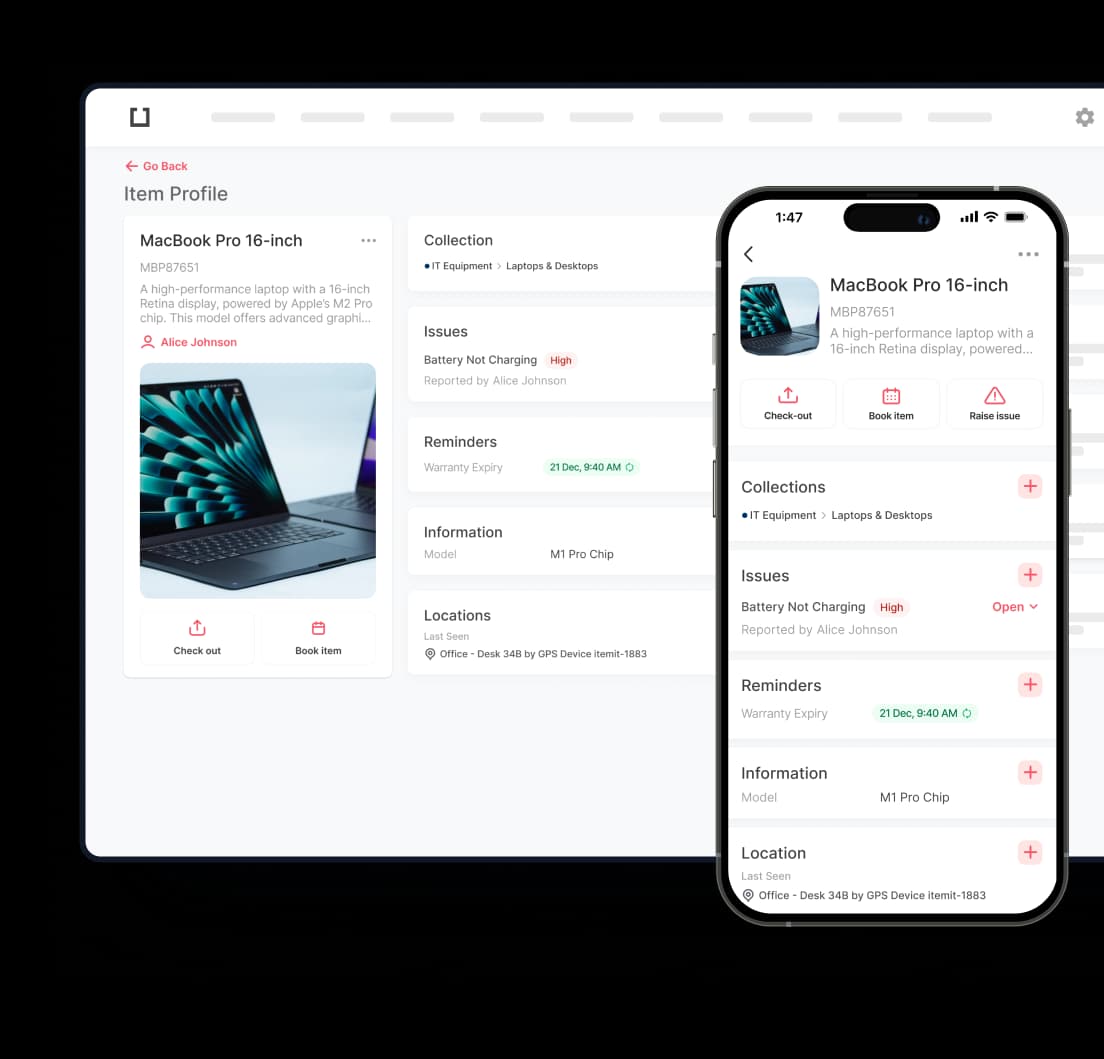
Teams using itemit can print and assign QR code labels directly from the platform. Each scan from a mobile device updates the item's location, status, and history immediately. For warehouses dealing with stock losses and unplanned downtime, missing equipment, untracked consumables, items checked out but never returned, itemit provides the visibility to catch those problems before they escalate. Maintenance reminders, check-out tracking, and audit-ready reports all sit within the same platform, cutting the labour hours spent chasing missing stock and keeping records accurate without extra administrative overhead.
itemit's mobile-first design means warehouse operatives don't need dedicated scanning hardware. A standard iOS or Android device runs the app, reads barcodes, and syncs to the cloud. For smaller teams, that removes a meaningful barrier to getting started.
Choosing the Right Setup for Your Operation
Not every barcoding warehouse configuration looks the same. A distribution centre handling thousands of daily picks has different requirements from a manufacturing site tracking components and tools. Before committing to a system, a few practical questions are worth settling.
How many items need tracking? Small operations can manage with basic barcode labels and a lightweight app. Larger volumes benefit from dedicated scanning hardware and software built for batch handling.
How fast does stock move? Fast-moving lines need real-time syncing. A warehouse with slower rotation can tolerate slightly delayed updates without losing accuracy.
Does the team work across a large floor area? Mobile scanning works better than fixed terminals in that case, and cloud-based software makes this straightforward on any device.
What else needs tracking? If the answer includes forklifts, tools, or PPE alongside saleable stock, choose a platform that handles both in one database.
The Case for Acting Sooner
The gap between warehouses still relying on manual records and those running a barcode system for warehouse operations keeps widening. Labour costs are rising. Accuracy expectations from retailers and end customers are higher than they've ever been. A barcode-driven operation addresses both by reducing the human input required at each stock movement and making errors visible the moment they occur. Teams that make the switch gain cleaner data, faster fulfilment, and the reporting depth to back operational decisions with real numbers.
Ready to see what a barcode system for warehouse operations can do for your team? Book a demo with itemit and find out how quickly you can get full visibility across your stock and assets.