
On the 11th day of Christmas, my true love gave to me: a great way to check-in and out my tools and equipment.
With itemit's new check-in/ check-out feature, managing your assets and sharing them amongst your colleagues is a much faster process. With this feature, you can book out your assets and see exactly who's using them and for how long.
Tools tracking has never been so simple. Use itemit's effective asset tracking and management software to check your assets in and out and increase accountability across the board.
Tools Tracking and Check-in/Check-out
One of the most significant areas check-in/check-out helps in is with tools tracking and management. The feature allows anyone to check their tools out to anyone they work with, or for your colleagues to check tools out to themselves.
It's a simple process. Whether you're looking for available assets or if you're checking out a tool to use for any period of time.
If you want to look at who is using which tools, or whether a tool is available, all you have to do is open web.itemit.com and check out the bookings tab. This has a calendar on it which will show you which tools are available and which are in use.
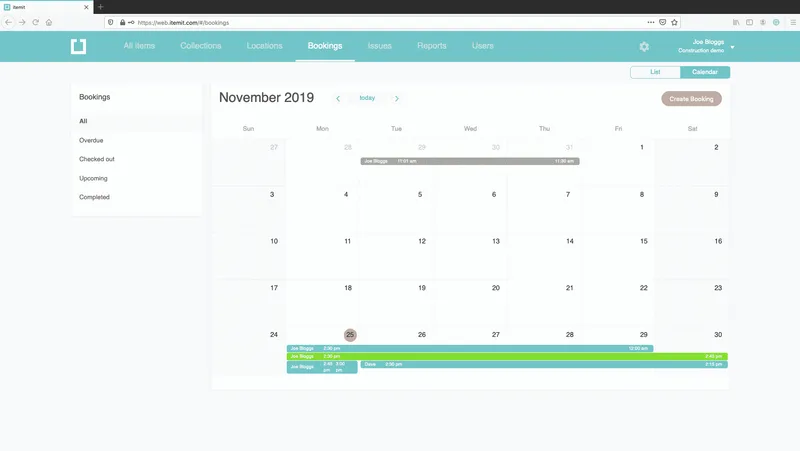
Alternatively, when it comes to tools tracking, you'll want to check out the tool or book it to use it. You can scan the QR code asset tag with your smartphone to open up the asset profile. After this, you can select "Check out" or "Book item."
If there's a conflicting booking, you'll see this right away. If not, the asset will be updated for your entire team to see. itemit provides you with a complete tools tracking process.
 Watch video





